Made in partnership with PixVerse. #ad
Get guides like this in your inbox every Thursday
Read it here free, or subscribe and get every new one, plus the AI news that matters.
Free, plus 4 starter guides when you join. One email a week. Unsubscribe anytime.
Halloween in Ancient Egypt 🎃
One character sheet. One prompt. A 15-second Halloween film with five shots, made inside PixVerse.
- Make a character sheet from your photo in Create, then Image.
- Add it as a reference in Video and turn MultiShot on.
- Paste one prompt and generate all five shots at once.
PixVerse 20% off: claim it with the button above. Valid on subscription plans only (credit packs are not included). New users only, one use per user.
Step 1 — Make your character sheet 🧟
Go to Create, then Image. Upload a clear, front-facing photo of yourself and paste the prompt below. You want four views on one image: front, side, back and a face close-up. This one sheet keeps your face and outfit the same in every shot.
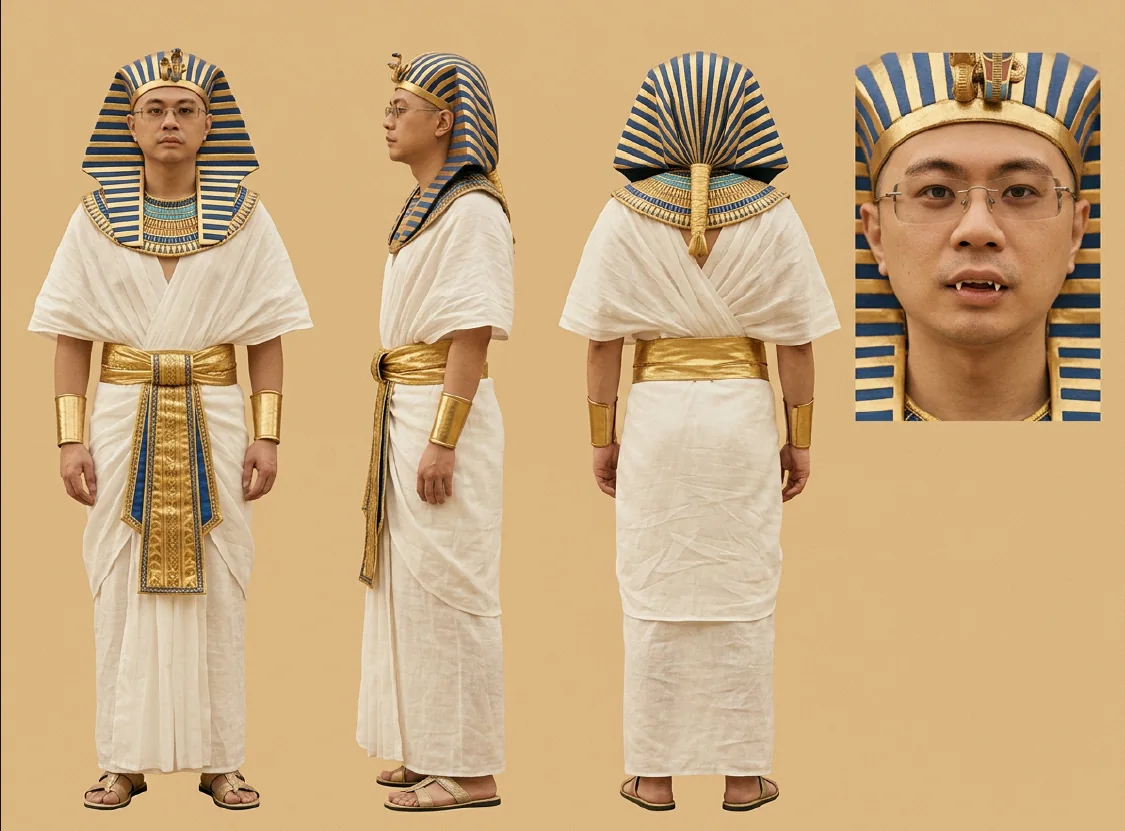
Character reference sheet of the person in the uploaded photo,
same face, hair and glasses (if any), dressed as an ancient
Egyptian pharaoh: striped blue-and-gold nemes headdress, broad
gold and blue Egyptian collar, white linen robe with a gold
belt, gold arm cuffs. Their upper canine teeth are slightly
longer than normal, their own natural teeth in the same
off-white colour as the rest, realistic, not plastic. Calm,
deadpan expression.
Layout: four views on one image: full-body front, full-body
side, full-body back, and one close-up of the face. Plain warm
sandstone-beige background, soft even daylight. Realistic
photographic look, warm golden-sepia colour, shallow depth of
field, light film grain. Same face, glasses and outfit in every
view. No text, no logos, no gods.
Steps 2 + 3 — Add it, then paste one prompt 🎬
Go to Video, add your character sheet as the reference, turn Reference on and MultiShot on, and set 9:16 and 15 seconds. Then paste the prompt below. Button names can look a little different in your app.
@image1 Using the reference image for the person's face and
outfit: keep every outfit detail identical, including glasses.
9:16, 15 seconds, five shots with hard cuts between them.
Found-footage style, filmed on a MiniDV camcorder from 2002,
shaky handheld throughout, never smooth, no gimbal. Halloween
in ancient Egypt, and everyone treats it as completely normal.

The person from @image1 is always dressed as a pharaoh in a
blue-and-gold striped nemes headdress, wide gold collar, loose
white linen robe and gold belt, deadpan. Their upper canine
teeth are slightly longer and pointier than normal, only a few
millimetres, their own natural teeth in the same off-white
enamel colour as the others, slightly uneven, realistic, not
bright white, no plastic look, no cartoon fangs. Their friends
are a mummy in bandages, a vampire count in a black cape with
a high collar, and a witch in a pointed hat.

Shot 1 (0-3s): in a sunlit ancient Egyptian stone tomb, two
attendants in white linen kilts pull open an upright sarcophagus
mounted on the wall. Inside, the pharaoh stands holding a
glowing carved Halloween pumpkin, studies it, then steps out.
Dust in a shaft of daylight, slow handheld push-in.

Shot 2 (3-6s): bright golden daylight in a dry desert temple
courtyard with sand dunes, a sandstone temple wall and a tall
hieroglyph-carved sandstone pillar in the right foreground.
Wide, the pharaoh stands by the pillar talking on a plain black
unbranded modern smartphone. A fast hard zoom to a
head-and-shoulders close-up. They look at the camera, pull the
corner of the upper lip back with one finger to show one
canine, grin and wink.

Shot 3 (6-9s): a busy mud-brick market street in golden
backlit daylight decorated for Halloween with glowing pumpkins,
papyrus bats, ghosts and orange lanterns. Mummies and villagers
shop and never look up. The pharaoh rides in on a plain
grey-and-black unbranded dirt bike, skids to a stop in a cloud
of dust at a pumpkin stall, points at the biggest pumpkin and
holds up one finger. The mummy vendor hands it over without
looking up.

Shot 4 (9-12s): a sunlit stonemason's yard with half-carved
hieroglyph slabs, a rope-and-pulley hoist and stone dust in sun
shafts. The pharaoh and friends carve giant pumpkins with
stone chisels and mallets. The mummy's bandage catches on a
chisel and he calmly unwinds it. Camera drifts in, handheld.

Shot 5 (12-15s): evening at the end of golden hour in a narrow
mud-brick village lane, low orange sun, lanterns and pumpkins
glowing against the dusk. The group walks to a door chatting.
The pharaoh knocks twice, a villager opens it deadpan and drops
sweets into their small hollowed-pumpkin baskets. A small
satisfied nod, and they walk on.

Look: shot on a 2002 MiniDV camcorder with a vintage lens,
transferred from tape to standard definition. Soft 480-line
resolution, visible tape noise and heavy film-like grain,
blocky DV compression, glowing blown-out highlights, milky
lifted blacks, faded warm sepia-gold cast, low contrast, dusty
haze, slightly smudged lens, heavy motion blur on fast moves.
Dust drifts through the air. Autofocus hunts, exposure
flickers, warm light leaks. No sharpening, no text, no logos,
no watermark. No brands anywhere.

Sound: low stone scrape, desert wind, a faint phone murmur,
engine rev and dust skid, chisels tapping, soft friendly
chatter, sweets rattling, faint drums.
If something looks off 🔧
- Teeth look fake? Edit only the teeth line in the prompt. Ask for natural, slightly longer canines in the same colour as the other teeth, then run it again.
- Face drifting? Use a clear, front-facing photo for the sheet, and keep the same sheet as the only reference.
- Too busy? Delete shot 4 and spread the other four shots over 15 seconds.
- Keep it brand free. Leave out real logos, brands and gods, and keep any props unbranded.
- Keep the camera look. The shaky handheld, soft tape-style look and the dust are what make it feel like real found footage.
Links 🔗
- PixVerse 20% off — subscription plans only · new users only, one use per user
- 🎬 Watch the reel — Instagram — @adam.godigital
Liked this? Get the next one in your inbox.
Every Thursday I research the latest AI systems and workflows, then break the best one down into simple steps, with prompts you can copy. Plus the AI news that changes what you can do.
Free, plus 4 starter guides when you join. One email a week. Unsubscribe anytime.